ip
KwunTalk User Guide
A Graphical User Interface (GUI) desktop app that helps you manage your tasks.
Here is how it looks!
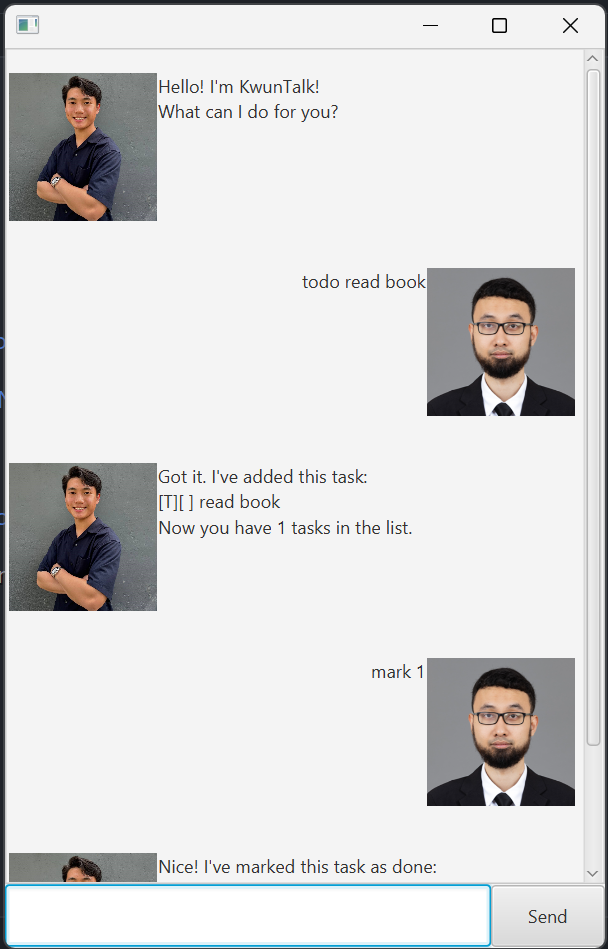
Launch
To start using KwunTalk:
- Ensure you have Java
11or above installed in your Computer - Go to the releases
- Download the
kwuntalk.jarfile - Move the file into an empty folder
- Open a command window in that folder
- Run
java -jar kwuntalk.jar(in the same folder as the jar file)
Features
Notes about the command format:
Words in <UPPER_CASE> are the parameters to be supplied by the user.
e.g. for todo <TASK>, <TASK> is a parameter which can be used as todo read book.
Listing all tasks: list
Shows a list of all tasks.
Format: list
Expected Output:
Here are the tasks in your list:
.
.
Adding todos: todo
Creates a Todo task.
Format: todo <TASK>
Example:
todo read book
Expected Output:
Got it. I've added this task:
[T][ ] read book
Now you have X tasks in the list.
Adding deadlines: deadline
Creates a Deadline task.
Format: deadline <TASK> /by <TIME>
WARNING:
<TIME> must follow the correct format: dd/MM/yyyy HHmm
Example:
deadline return book /by 11/11/2024 1100
Expected Output:
Got it. I've added this task:
[D][ ] return book (by: Nov 11 2024 11:00 AM)
Now you have X tasks in the list.
Adding events: event
Creates an Event task.
Format: event <TASK> /from <TIME> /to <TIME>
WARNING:
<TIME> must follow the correct format: dd/MM/yyyy HHmm
Example:
event meeting /from 11/11/2024 1100 /to 11/11/2024 1300
Expected Output:
Got it. I've added this task:
[E][ ] meeting (from: Nov 11 2024 11:00 AM to: Nov 11 2024 1:00PM)
Now you have X tasks in the list.
Marking task as done: mark
Marks the specified task as done.
Format: mark <TASK_ID>
WARNING:
<TASK_ID> must correspond to a task number in the list.
Example:
mark 1
Expected Output:
Nice! I've marked this task as done:
[T][X] read book
Marking task as undone: unmark
Marks the specified task as undone.
Format: unmark <TASK_ID>
WARNING:
<TASK_ID> must correspond to a task number in the list.
Example:
unmark 1
Expected Output:
OK, I've marked this task as not done yet:
[T][ ] read book
Deleting task: delete
Deletes the specified task.
Format: delete <TASK_ID>
WARNING:
<TASK_ID> must correspond to a task number in the list.
Example:
delete 1
Expected Output:
OK. I've deleted this task:
[T][ ] read book
Finding task: find
Finds a task based on the keyword provided.
Format: find <KEYWORD>
Example:
find book
Expected Output:
Here are the matching tasks in your list:
[T][ ] read book
[D][ ] return book (by: Nov 11 2024 11:00 AM)
Example:
find hello
Expected Output:
There are no matching tasks in your list.
Exiting the program: exit
Exits the program
Format: bye
Expected Output:
Bye. Hope to see you again soon!